If you are still managing your day to day calendar, your contact's, and to-do list in a myriad of paper lists, day planners, and refrigerator calendars than this tip is for you.
Facebook has introduced people to the idea of creating event's online and inviting people to attend, and many have been doing this at the office for many years. For many, the use of an email address as a way to contact family members, acquaintances, and co-workers is easier done through social media. Those doing so have come to see the benefit creating events and sending out invites, managing contacts, etc., but may not realize you have the ability to do so using the powerful device you carry around in your pocket or the provider you use for your email.
Below are some examples, benefits, and options as it relates to keeping an address book outside of social media... and the best part, is there are now a lot of tools to tie your address book to your favorite social platform to "sync" information giving you the best of both worlds. The purpose of this article is to enlighten those are unaware or have interest in making life more efficient by leveraging devices and services they already have.
Mobile + PC/Mac + The Internet = Synchronized, Always Connected, Your Info Anywhere, anytime
The Cloud is a relative term for the internet, within the context data storage and functionality being done "Online" instead of locally on a PC. If you are accessing your email via a website, then essentially you are doing so in s "in the cloud". We have always have had the mindset of the internet as "www" and Internet Browsers, however unlike 10 years ago the world-wide-web is just one of the ways to interact with and leverage the potential of the internet,; hence the "The Cloud" is simply a reference to how we access the data and information.
Mobile Devices & Smartphones:
Woven into the fabric of our daily lives, smartphone sales have far outpaced the demand for simple cell phone, as tablets will eventually do for laptops and PC's. The smartphone and tablet revolution gave us the APP '(application), which is simply a portal to access information "the cloud", where the interface and functionality relates to specifically to the functionality (i.e. mobile banking ): simplifying and improving the end user experience, addition and minimizing the extra work necessary to conform the restrictions of web-browsers, operating systems etc.
While the practical benefits of these devices requires little explanation, it is necessary to define their scope for the purpose of this article as it relates getting the most benefit from their user. In my opinion, innovation and availability of the latest technology has exceeded the pace of which people are able to comprehend, and is the basis for my this article as well as the value proposition and helping those look at the overwhelming landscape of options, and decide what is best suited for their needs and availability.
Web-Based Email
In addition to smartphones and Tablets, many people have web-based email Gmail, Yahoo, Apple, Hotmail, AOL etc for many years. Since all email is email is in the cloud since it's coming over the Internet, it again comes down to how that information is accessed and the easy of which is can be synchronized between different devices. While nearly all email providers offer the "Standardized" protocols (methods of transferring data back and forth) most people are using one of these major providers, which have the added benefit of native connection special configuration and 3rd party software) with major device model and operating systems (iOS, Android, Windows, etc) NOTE: It is important to note that as of the last few years, the battle for market share has had an impact on the consumer (e,g, - Syncing more than just email with Gmail has become a little bit more difficult on iOS and popular Desktop Clients such as Microsoft Outlook. I have done extensive research and configuration on a variety of system in order for various scenarios and can help you achieve the desired result.
The benefits to using desktop, web (cloud), and mobile device together:
Calendars
Create On-Time or recurring appointments or "meetings" (birthday parties, work events, etc.)"
Set a "lead" reminder - how long beforehand you wish to be reminded of th meeting
"Invite" co-workers, family, friends using thier email address - automatically sends email with meeting dettails
Invitees with calendar can automatically receive the appointment and can "Accept", "Decline". or Indicate "Tentative" attendance
Meeting responses are automatically updated on your calendar (automating/eliminating the need for RSVP)
Changes, updates etc. (e.g. new time, or additional details) are automatically sent to atteendees
Create Public Calendars or Subscribe to Public Calendars (e.g. Office Event Schedule)
Contacts/Address Book - More Than Just Firstname and Lastname
Email Addresses
Phone Numbers / Fax Numbers / Work Numbers
Addresses Info
Birthdays
Spouse, Groups, and Relational info (i.e. "friends" or "The Smith Family"
Tasks/Notes
Create one-time or reoccurring reminders
Set the "lead" time for warning
Included in your daily "Agenda" or view customized view
Some applicatiions such as Outlook allow you to "Assign" tasks, or send "Status Reports"
What about inter-compatibility?
These days, inter-platform (Android smartphone, Mac desktop, Gmail Account) is an entirely feasible problem. While a lot of devices account for this, often there may be a certain piece of functionality that one does not offer or allow you to "sync" with.
At SimpleAssist, we can provide you with a myriad of options for bringing this together. Visit www.simpleassistme.com for additional tips or r Contact Us today for a free consultation!
I am a MS Office 365 2013 subscriber, an iDevice user, and someone who likes when applications and hardware play nice together. (The other day I posted a method to sync Outlook 2013 365 edition with your Google Apps account). If you of fan of Excel, Word, PowerPoint, etc. Microsoft's 365 suite a pretty decent offering (basic plan allows you to install on up to 5 machines for a low monthly price). These cloud based options can be scaled from home, education needs, or even to small and medium size businesses who need MS Exchange, VoIP Phone Solutions etc, all available with the "Cloud-based" Subscription model. So, as with everything these days, how about the mobile device versions? For me, a search of the App Store yielded nothing. It wasn't until I was reviewing my account online that I noticed the option to download "Mobile" versions, and realized Apple is allowing app developers a "proprietary-ish" deliver system. Therefore, if you are interested in using MS Office on your mobile device (Android, iPhone/iPad or Windows Mobile) then you can visit the link below from your device to be taken directly to where you need to be for downloading. Anyhow, if you subscribe to MS Office 365 and are looking for the mobile apps, the direct link is included below! (Alternatively, you can sign into your Office365 account and select MOBILE from the main page). Direct Link to Office 2013
Viruses and malware are arguably are one of the biggest threats to our way of life in this country. Wow, dramatic stuff eh?
Right now we are in the glorious period of Internet Utopia where everything and anything can be found online, but as we all know from our experience with human nature, where there is money to be spent and made, there will be those who go about it dishonestly.
In fact, one the foremost major concerns for the US Government and major CyberSecurity firms are organized "Cyber Attacks" such as a DOS (Denial of Service): An infection that comes in through one of the methods I will mention below, typically called a BOT and instead of throwing up adds based on your website history (like Malaware), this little software program is what opens the door for malaware, spyware, and very serious malicious tools that can often stay under the radar, install other programs, and consume system resources. However, it's the scary fact that they can also unknowingly "slave" your computer into doing things without your knowledge!
So, (and this is reality) imagine millions of computers infected with a particular bot that's been waiting like a "sleeper cell" to carry out it's mission, which is not being caught by your Virus/Malware protection since many folks don't scan specifically for this type of threat; They lay dormant, until activated and suddenly the machine is completely taken over (sometimes without the user ever realizing it) and takes over your email account and other programs, and with the army of those other millions computers, brings down an entire website from what I can only liken to a bolt of lightning hitting a transformer.
They could probably be doing more to educate people, but that is a subjective statement at best. What I believe they do understand is that these type of attacks arguably make up for the biggest threats we face as a nation from a terrorism standpoint and (our entire infrastructure is connected to computers) a work together with industry insiders to combat those who would do us harm and use their knowledge for evil. (Note to prospective College Students: Forget I/T as a degree, the need for I/T people will reduce significantly over the next few years. Cyber Security is where it is going to be at in this century.)
So, why is this important to you? It is important, because much like "see something / say something" (fundamentally) we are all responsible for protecting ourselves and making sure we understand the different type of computer related infections, what needs to be done to prevent them, and how the dynamics are changing. Furthermore, it doesn't have to be difficult or inexpensive!
What types of Malicious Software Should I be Concerned About?
Bots, Warez, Spyware... oh My!
Well, we've all heard the different terms. Here's a great summery of the different types of infections which are currently out there. Jimmy Ray Purser explains it nicely.
Staying Safe / Methods of Protection / Tips Part 2 (Part 3 will have additional information. You can also contact me for a free assessment)
While there are a ton of software providers out there offering "system cleaners" and "Full Service Protection" at varying pricing levels. As I have mentioned before, for every one of those "paid" services, there are 3 free/alternative to subscription model methods that can minimize your investment.
Firewalls
Don't let a program change your firewall exceptions unless you know for sure it's safe. Part 3 of this series will have my specific recommendations, but check out this video from Jimmy Ray Purser to find out exactly what a firewall does!
NOTE: Beware of pop ups and system cleaners. They are especially untrustworthy in my opinion and are usually downloaded as the result of a fake popup that makes you think your virus/firewall program is warning you!
Email - Email - Email
When you receive an email with pictures in it, that photo is stored on a website and your email program has to go get it. Not only does this open you up to downloading something unintentionally, it's also the way marketers track whether you open, read, delete, or respond to an email. Set your email program to only download pictures from safe senders (people you trust).
Spoofing/Phishing
Often, because it's easier to create a domain and an email address that looks similar to the real thing, and even post a fake website that looks exactly like the real thing, Spoofs are a huge way to get hacked as they are looking to collect sensitive information by tricking you into filling it out. Everyone has come close to this I believe, as they look very rule. If you remember the tips below, you'll be WAY ahead of the game.
Here is an example of a spoof below (Click on Photo for additional information on spoofing):
Look at the email header or url (if you clicked to open it): It may be very close (e.g. mail@facebook.com vs. mail1-facebook31@mail.facebook.net. Remember, anyone can change the FROM to what they want or setup a domain (e.g. www.faceboo.com - they go after spelling errors often). If you suspect the email is a spoof, you should contact the institution.
Does it say Dear Customer or does it have your first or last name? Spammers buy email addresses or use programs that just mass send to different variations on domains, so it's rare to get a spoof that says Dear Joe/Jane from a spoofer . THIS IS ONE OF THE BIGGEST INDICATORS
No reputable company will ever ask you for your SSN or CC/Banking Info (And the spammers are wising up to that, which is why they have you go to a fake web page).
Check out sites like SNOPES.com who validates internet fact and fiction
Downloading and Opening Files
Probably the most common way of getting viruses these days is through downloading a file be it email or via the Internet.
EMAIL
For email, it's pretty well known you don't open any files from anyone you don't know, and never anything that is an executable (like an .exe file). Also, since people often get their accounts hacked, being vigilant on what you do open is critical. Always DOWNLOAD the file from the email BEFORE opening and THEN right click to scan with your virus scanner. (some email programs do this automatically, but it can't hurt. If you don't know, Google is your friend
WEB
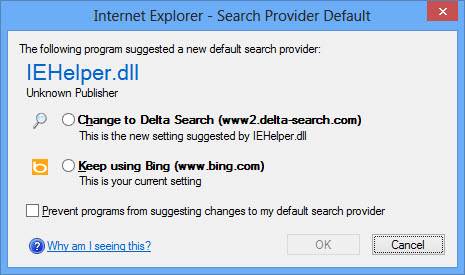
Even I've gotten caught up in this one lately. Freeware or trial-ware can be a double edge sword, as companies like downloads.com have gone to a system that basically trades you a free program, and tries to slip things like TOOLBARS (Toolbars are virus magnets and completely unnecessary these days)
You can usually find the actual file with some digging but this is again where it's critical to SCAN your file before opening or unzipping. The download managers even try to give you reasons why they need to be a "middleman" between you and the file that you want. The trickiest one I've seen was a program where if I didn't click under advanced options (which usually gives you specific things related to the program setup) I would have never seen that the advanced options were INSTALL TOOLBAR, SET MY HOMEPAGE, ETC.
THIS IS THE MOST IMPORTANT ADVICE I CAN GIVE - READ BEFORE YOU DOWNLOAD. YOU DON'T NEED A TOOL BAR, YOU DON'T NEED TO CHANGE YOUR DEFAULT SEARCH PROVIDER, YOU DON'T NEED ANYTHING EXCEPT WHAT YOU ARE TRYING TO INSTALL
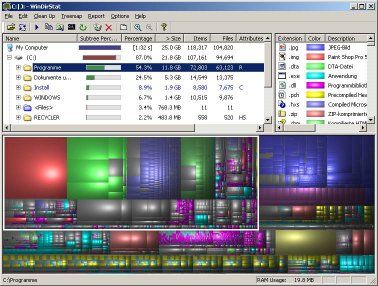
June 13, 2013 (Originally Posted) Ever wonder where the files taking up your hard drive? Recently I began wondering after I found myself frustrated that I had filled up nearly the entire terabyte on my laptop, and having lost the cord to my 2T external... :-)I started thinking... how difficult is it in this modern world to figure out where your large files are? I mean, we know the files that we don't want to delete are usually stored (pics, videos etc) but to have to go to each folder on the computer and to view the size, I figured there had to be something better, figured that it had to be "visual" and did some digging.
I will be adding this to my TOP TIP category... check it out! Click here to read a reviewby tech a writer who reviewed Graphical Hard Drive Interface programs that can help you "road-map" your hard drive, so you can make freeing up your hard drive (and your life)... a little easier. My Recommendation: WinDirStat: Windows Directory Statistics - WinDirStat (WDS) is a disk usage statistics viewer and cleanup tool for Windows. It shows disk, file and directory sizes in a treelist as well as graphically in a treemap. It's fairly simple to use, and get's the job done! Website for WinDirStat: Direct Download Link (SourceForge):



 June 13, 2013 (Originally Posted)
