Showing posts with label Application Recommendations. Show all posts

Wednesday, November 26, 2014

Special SimpleAssist Internet, Winter Storm Frustration and Power Outage LifeSync Tech Tip

Move to Florida

 Not sure about the hurricanes and the power but hey, it's warm. 



Happy Thanksgiving!
From


Yeah, the Internet Goes Down for Everyone Sometimes...

Tuesday, November 18, 2014

SimpleAssist Small Business WorkSync: Clip pictures and videos from your desktop or mobile device, edit, publish PDQ

SimpleAssist WorkSync: Small Business "Production"


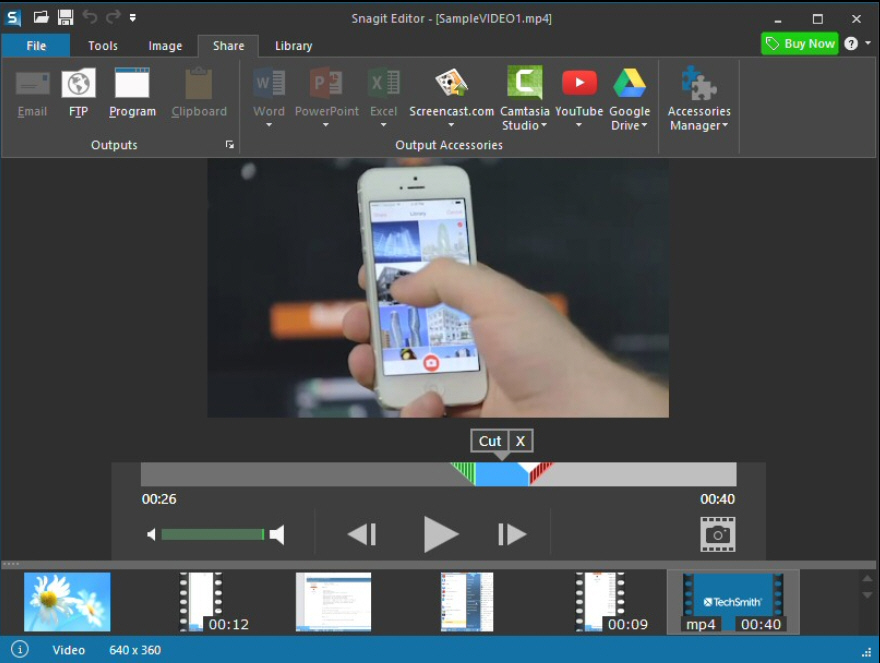
Imagine the Microsoft Screen Clipper and MS Paintbrush on Steroids, on the front/back end respectively. Screen and video clips done with 2 clicks of the mouse, which are then transferred to the photo editor; which holds it's own as a super simple, yet deceptively powerful stand-alone editor.  

All images, not simply the clips can be converted, edited etc. Furthermore, SnagIt can be set as default editor right in Windows, and in the latest version now allows for mobile screen / video clips and training.   If I was the Oprah of tech, this would be in the top 5 of my favorite marketing /design tools "things".  


I don't give those Kudos lightly, but having used SnagIt since 2005 alongside of all sorts of varying desktop and web-based publishing / creative suites, we needed a way to easily Snag, edit, and produce constant for both sales / marketing/ client newsletters etc.  In fact, I  can get away with SnagIt for most day to day needs -  from business cards, to web content, to short training videos.  As a consultant, I often recommend Snagit over more expensive or difficult program.  Let it be known I receive no compensation or recognition from them, but maybe I'll look into it. :) 

In short, it's right in line with the SimpleAssist philosophy of finding the best tools at the lowest prices and the low "buy it / own it" at a relatively very low cost (compared to something like Photoshop), combined with the amazingly simple design, low drain on system resources and something I find important, a consistent intuitive interface that they continue to upgrade but not change to maximize functionality make it a win/win./win.  I've used every version since then, and the cost-to-value is phenomenal.  

The editor itself is worth the price of admission, especially if you're not a designer and overwhelmed by Photoshop or Corel or other more sophisticated programs.  

Details Summary

I. A resource light program that runs in the background and remaps your print screen button (or allows you to make up your own key commands) to take a screen print.   I know...  a SCREENPRINT!?  Not too exciting right?   Well, with a few clicks you can capture everything from a scrolling web-page (imagine grabbing the entire Wikipedia entry for "http://en.wikipedia.org/wiki/List_of_law_clerks_of_the_Supreme_Court_of_the_United_States", one of the longest ones on the site) to clipping your keystrokes and even narrative audio as a quick video quick video.

2. A fantastically easy, yet extremely powerful photo editor - seeing is believing I suppose, and the price point makes it nearly a no brainier after the trial

3. Integrated export into different programs such as YouTube (great for throwing a quick tutorial or training together).  

Sunday, November 16, 2014

SimpleAssist Software Spot-lite - Streaming made easy: no wires to TV, and Netflix without breaking a sweat... ... Chromecast is hard to match

Google Chromecast:  The Best $35.00 Stocking Stuffer 

...Ever


When I received one of these, tech junkie as I am I thought "ehh, I have a Jail-broken Apple TV - I can stream anything."  Not thinking, "even though.. I had to literally jailbreak it (yes that is legal) to get past the restrictions of displaying my media.  

Conversely, Google (and Chromecast by extension) work on most computers and mobile devices, the Chromecast is simply an HDMI plug, USB plug for power which wireless streams and mirrors content from almost any phone, tablet, or PC right to your Television.
However, it was finding out the price that had me looking for a catch and I gave it a whole year before recommending it.  For my business, I'm actually carrying these around with me now for the holidays for when I run into people who have great TVs and all the devices and either pay too much money or use a wire. 

The guide below is a hodgepodge tutorial of questions which I hear from my customers, and hopefully it can help this holiday says.

Please email me at dshocklee@simpleassistme.com if you require additional info of assistance. 


Merry Holidays.


Derek Shocklee

Founder
The guide below was a tutorial that i put together for a customer who needed a SimpleAssist.  There's a lot more to Chromecast than you may know! 


Chromecast Tip Guide


B
elow are some quick tips I wrote up for thing like reconnecting or for your future reference.  

I like it because it's solid, and I'll do everything I can to help and replace / return if necessary.  

I like the Chromecast as opposed to other "dongles"  as it just "works".

  • The Chromecast device only needs to be configured once to connect to the network (see setup below) so it can be seen on the WiFi network (when you take it with you somewhere, you'll run it through the setup using the Chromecast app - see here for some neat tips and tricks)
  • If you ran setup once it was already set, it could have connected directly to the Chromecast device directly (not through router) and disconnected it from the network.  In that case you could simply unplug it from the TV and Power (soft reset) and try reconnecting via setup in any Chromecast (Mobile or PC) app.  
  • If all else fails (although these things are built well, so it usually doesn) is a Factory Reset which will either fix If that doesn't work, you could connect and factor reset the device (hard reset), but that's not usually necessary
Setup
Tips
  • Chrome is a web-broswer on PC and Chrome for Mobile is a web broswer for mobile devices (tablets) and smartphones
  • if you want to unplug the Chromecast from HDMI and connect to another TV in the same house, you don't need to reset up (you only have to run setup again if it loses connection to the network
  • If you want to travel with it, the best thing would be to use your 4g mobile data router -  as long as they can find it each other wirelessly initially (direct connection) and then via a shared network, you should be not have an issue.
  •  Some cool basic tips  + Casting Ready Vs. Casting a Tab
  • Once setup, the Chromecast app is not absolutely needed on any particular device (except Chrome on PC) which you can get by itself on the Chrome Web store (by itself =without running setup), since many apps for these devices are Chromecast Ready on apps and web. 
  • Mirroring (Duplicating Audio/Video via casting) of a device work presently on PC and Android -  iOS let's you cast from the Chrome app so that gives much more access. 
  • Once the Chromecast is setup, the only requirement is that the device is connected to the same network and to use it, you are using either Chromecast ready apps (iOS or Android) or Chrome on that device (this is not well known but if you can cast from the app like you do on your PC.  See here "Google adds casting to Chrome for Mobile App" 
That said, it's good to have the Chromecast app on the devices which is why I advised to download (so you can use it when traveling etc).  Here is a link to the Chromecast basic setup on general setup etc - http://www.google.com/intl/en/chrome/devices/chromecast/

What's great is that the Chromecast is pretty solid in that way -  if it does have an issue it will usually soft reset (power down / power up) and you can always factory reset (clears configuration) from the that would return it to out  of box mode.   These options can be initiated via the Chromecast app on mobile/PC.  (that would be step 2 if there was an issue).  

Again, once we set it up again the key is that is doesn't have to be setup again on the other devices - they just have to have either Chromecast ready apps or Chrome (as of this summer you can cast from Chrome Mobile on iOS and they will have mirroring soon) That means if someone is at your house and  the want to show you a video, they can simply connect to your network - open up YouTube or Hulu and hit the chromecast button) - Chromecast works with pretty much any device, it's just having the apps (most of the popular ones) or Chrome browser installed (which most people do)


This is just the first of several tips about all the amazing things you can do with your holiday gadgets for home and business this year.

Follow our online presence by visiting the links at the top, or check out our all in one social portal at http://www.simpleassistme.com/#!social/cst7  about..

-Derek

Derek Shocklee
Founder
SimpleAssist - www.simpleassistme.com
qrcode 17024054

Tuesday, July 1, 2014

WINDOWS XP USERS - Post April 8th 2014 XP “End of Life” support - Upgrade Tutorial (Previously Unreleased)

 “Quick Tip” Preparation and Overview for  Windows XP End of Life Upgrade Tutorial and How to Transition Safely, Efficiently, and Cost Effectively


I. Preface -

I had written this a few months ago (on April 7th in fact), and thought I had lost it.  I found it, so while many may or may not have moved on from Windows XP - as this C-NET Article: 
Windows XP still alive and kicking points out.  Either way, there are some good ancillary tips in here and I would personally recommend getting away from XP as fast as you can@ :) .  
SimpleAssist shares it's tips and tricks for free, and can be contracted to provide personalized solutions for your home and business at www.simpleassistme.com


II. Objective

SimpleAssist has put together this guide to help users affected by the Windows XP End of Support deadline, outlining steps to simplify the processes of upgrading Windows XP, or preparing for a transition to a new computer.

This "DIY" guide is intended to help those who need to prepare, and is applicable to both upgrading your existing platform or transitioning your data over to a new computer.  Our goal, as always is to help users save money, stay safe, and make sense of real world option by "tuning-out" the noise and misleading information (e.g. Microsoft's claim that many users will need a new computer) based on our real world experience and overall knowledge of the technology landscape.   

Ultimately, the goal of the end users should be: 

  • Evaluating the cost vs. benefit of upgrading Windows XP vs. purchasing a new hardware.
  • Ensuring the existing platform and personal data is free of Viruses and Malicious Software, and can be safely migrated to an updated version of Windows on an existing or new computer
  • Recognizing the danger of continuing to use Windows XP without official support from Microsoft.   

The steps below are aimed at helping those interested in achieving the aformentioned goals by providing a detailed suggestions - including software tools and methodologies - that reflect the real-world experience of the author and in the best effort to minimize the cost and burden of our followers.

 We remind you that this guide, in and of itself, cannot accommodate for the variable nature of your unique system setup including; hardware, software, and skillset and/or needs of the reader.  The document is meant a a good faith overview based on the experience of the author and therefore, should be used only at the risk of the "Reader" and cannot guarantee a successful outcome.  These suggestions (including software recommendations) are also based on the experience of the author, and are not specific endorsements.

SimpleAssist, a technology and repair consultant firm, can be contracted for hire to provide direct one-on-one assistance and can then assume responsibility for the success of these suggestions.

III. Preparation

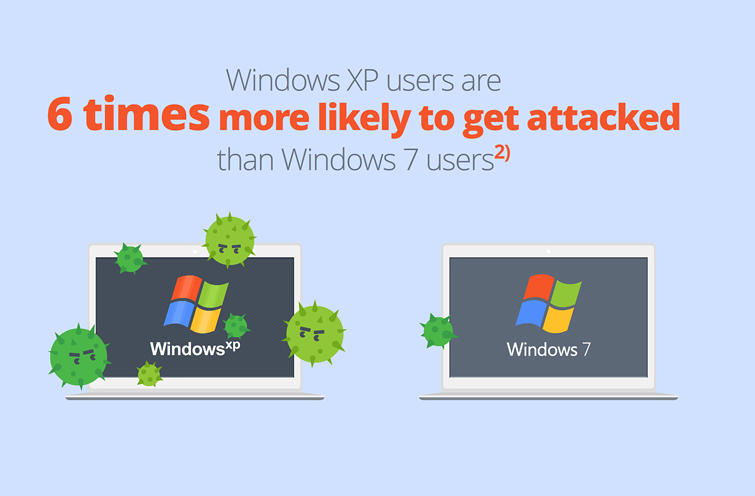
  1. WATCH OUT FOR SCAMS, OFFERS, ETC.  Beware of responding to solicitations regarding upgrade assistance, beware of fake emails or phone calls, and contact someone you trust if you are unsure.  As indicated in a previous blog post, there are scammers and malware infections targeting Windows XP users, in addition to all the hardware manufacturers who's interest is selling hardware that may not be needed.  We strongly recommend evaluating your needs with a trusted professional, and the cost vs. benefit of upgrading your existing platform vs. migrating to new hardware as the processes of transferring data, settings, etc. is relatively similar.    
  2.   Find as many of your product keys, emails and discs that you can find for reinstalling your own software as an upgrade (or transferring to a new computer) is a "CLEAN" installation.  There are tools, you Use a Key Finder such as Magic Jelly Bean Key Finder (NOTE: Remember to click on ADVANCED TAB to UNCHECK the conduit search toolbar, as per my blog post here) or this other amazing program that will locate the serial keys from your registry.
  3.  Hit START – and search for CREATE RESTORE POINT (just in case there is an issue, you can restore your machine to this point in time
  4.    Update Windows XP to 4/08/14  If you were unable to update Windows XP prior to the  Anytime Upgrade Program (Note: Download both the Windows 7 and 8 version). IF YOU CANNOT UPDATE WINDOWS, DON’T WORRY - NOTE:  If you were unable to do this prior to 04/08/2014, you can still download an OFFLINE updater that will install and download the updates.   You can find this tool here.
  5.  Go here to download the Windows 8 or 8.1 UPGRADE ADVISER.   This is a must do -  this will really be the key indicator as to what programs, drivers (hardware), etc. will run in Window 8.1 - NOTE:  Read the two options very carefully!

    I've upgraded many computers to both 7 and 8.1 - computers as old as 2004 without a problem!  However, it's important to make note of the information related to specific programs and hardware issues, so you know what programs, features, and hardware will run on Windows 8.1 and what you may need to rebuy (fortunately, if you most programs are now subscription based so if you had Office 2003 on there and spent 500 bucks you can get Office 2013 for 10 bucks a month after 30 day trial.  

    This utility will also tell you how you can purchase Windows 8, and what can be transferred.   This is always the tricky part, and while Windows did get a company to offer to do the data migration you're still better off using with Windows Migration Tool in my opinion.  to be updated, and how you can purchase Windows 8 Note: Both Windows 7 and 8 have Windows XP program compatibility modes and, depending on what version of Windows, even “virtual” emulation of Windows XP programs.  I.e. your problem with program compatibility don't change if you buy new hardware VS. upgrading.  
  6. Want a free trial of Window 8.1 that you can use for a year?   (You have to rearm it ever 90 days and when you're done you'l have to do a clean install with a purchased license or transfer your data to a new Windows 8 machine.  Either way, a great stop gap.   I've been recommending this to my customers who think they will be making the transition to a new machine to sort of "get them used" to Window's 8.1 hybrid mobile / Windows Desktop functionality, give you the best of both worlds.   As much as I disagree with shutting down XP support, Windows 8.1 is a solid O/S.   (Which has greatly improved over the last year)
  7. Download the updated Malwarebytes 2.+ (while your there, you may want to check out MalwareBytes ANTI-EXPLOIT - especially if you're are still running Windows XP).  
  8.  DO A FULL SYSTEM SCAN of your Computer - www.malwarebytes.com -it's free, and it has a great new easy to use interface -  they update their malware definitions all throughout the day so make sure you’re upgraded before you scan (NOTE:  If you had Malwarebytes on your marine and it says TRIAL EXPIRED, simply RIGHT CLICK on the icon in the system tray and it will give you the option to UPDATE and then START SCANNER.  Feel free to try the premium trial. The premium version adds more convenience features, and REAL time protection however Windows Defender and Microsoft Security Essentials can handle your firewall and real-time protection.
  9. If you have infections, follow the instructions given to quarantine.   Note, viruses infect system files which are not always fully accessible in “normal” boot mode.   After finding threats, reboot the computer and begin tapping F8 to bring up SAFE MODE WITH NETWORKING (Safe mode with access to your network/internet).
  10.  Download Microsoft Security Essentials  -  MSE continues to upgrade the VIRUS (not the exploit and patch definitions) for their antimalware, plus it's free. I don't want to sound like a Norton hater, but I've had more luck with Malwarebytes and MSE combined than with any "pay to play" antivirus out there.  Even if you just run the Microsoft Maclicious Software Removal tool, and Malwarebytes you'll be doing much better already!   NOTE: This is a short term option ideally you need to get to a higher version of Windows or you will be compromised as important Operating System Patches are no longer available Windows XP.   (Note: We recommend you run Malwarebytes FIRST before installing MSE.
  11. Restart the Computer in Safe Mode -   Start the computer, tap F8 repeatedly and launch SAFE MODE.  This should be your second scan so your definitions should be up-to-date
  12. After making sure you are virus free), start Windows Easy Transfer -  this allows you to backup EVERYTHING from the computer which you should do anyway.   If you DO Not have an external drive, I have a free solution for you that I use and love called Crashplan.   Email me at dshocklee@simpleassistme.com.  Windows Easy Transfer – W.E.T takes all your settings, folders, files etc. and migrates it to a .mig file that you can use to import your user info, etc., into Windows 7 or 8.  If you don’t have an external hard-drive large enough to save the file, read below.
  13. NO EXTERNAL BACKUP?  There is an amazing Cloud based backup solution called CRASH-PLAN that will allow you to backup UNLIMITED amount of data for 30 days!  Note:  If you have heard of Carbonite, Crashplan is similar, has a FREE FULL 30 day trial and works beautifully in the background and providing daily emailed reports on the status.   Backup EVERYTHING, as the next phase of will be centered around getting your computer back to the state you are most comfortable working (font’s, customization's, etc. – even though it’s  clean install, there are ways to bring over information in order to simplify things).   As far as Crash plan, it is a SimpleAssist editor’s top pick for cloud based backup software and ideal because they are offering UNLIMITED storage, without a credit card, for 30 days (Also lets you backup to multiple computers or drives etc.). Regardless of the direction you plan to go (upgrade vs. new computer) you will be doing a "CLEAN INSTALL", and this will make it a little easier to save your settings and migrate everything over
  14.  Don't completely trust you’re other Antivirus programs that you are Virus Free - This whole story was based around 2005 Machine Running Norton 360!  After I removed the Ransomware, Norton and McAfee (I installed it just to see said it was OK), but Malwarebytes (free) found 142 infections.   Between Malwarebytes and Windows Security Essentials you should be able to clear out your malware so you don’t risk reinfection upon upgrade / re-installation.
  15. I also recommend signing up for Chrome if you aren’t already on there, and due to the  due to the seamless cloud integration features for all of your bookmarks, history, etc. Google is all cloud based, so in terms of future proofing your data, the “platform” methodology will really change the potential for all much more than a web-browser, and it really can make this processes easier on you!
More information will be forthcoming!  

Wednesday, June 11, 2014

The Daily Explosion of the To-Do List: Try a Simpleassist LifeSync QuickTip

SimpleAssist LifeSync QuickTip:  Too much noise, not enough Hours in the day?  Try a 3rd Party, Cloud based Task Manager like Wunderlist with  your email to focus in on only shhhhstuff you need to do. 


RECEIVE A LOT LF CALLS AND EMAILS? SEE BOTTOM  FOR A SPECIAL 3 STEP ORGANIZATION GAME CHANGER 

As a long time Operations Executive turned consultant, I have had my share of setting up organizational task management systems using  a variety of different platforms such as CRM or mail clients.  However, without fail there was  the perpetual challenge of "ok, what if we're doing something outside of the system  and forget to put in a task reminder".  This would typically involve setting up a secondary workflow, writing custom synchronization and Yada Yada Yada as Sienfeld once said. 

Say Hello to my Little Friend 


Enter Wunderlist:  a feature rich, cloud-based  multi-platform/muti-device task management system which,  much like another favorite organizational tool of mine (Evernote) amazes with what can be done for "free" (where upgrading to the paid subscription is "Value Added" and not "Requirered for Value" like many other programs that wet the whistle only to make you fork over a subscription. In other words, it's great for personal use, but if you need more sophistication, as in a business setting for example, THEN you can CHOOSE to pay nominally   


I should preface with the fact that Evernote is capable of managing taks and is  always one way to go because of its similar cross applicability, flexibility, and it's ability to keep tasks and reminders.   However, I personally feel it is limited for tasks in several ways (depending on what you're doing) albeit the excellent scalability and  similar ubiquitous methods for adding content, as indicated below. 


Easy Task / Hard Task: Key Points


However, for as anyone who's ever used a CRM like Saleforce/Dynamics CRM, or Outlook / Exchange to manage tasks - there is typically a need for "middle ground" between flexibility and accountability - and in Evernote you cannot "assign tasks", easily create sub tasks, etc among other things.  


Suffice it to say, Task management  is not always so simple as clicking the "done" box - and this where #Wunderlist shines.  Here are some key points:


-Wunderlist can be used and synchronized concurrently on different device models, or accessed via mobile / standard web portals. 


-Uses mobile device "Push" Notification, Email Reminders, and other clever reminder options


-Allows for Task Sharing and Assignment (Requires user to setup Wunderlist Account


-Allows for Sub-tasks (e.g Task = Write Book, Subtask = Research, Design Covdr etc)


-Category Customization (which can be used can be set for individual or multi-user (requires free Wunderlist account per user) to maximize and simplify #organization. (E.g Team Task list vs My Tasks) 


-Simple Collaboration  - other users can comment on status etc if they are able to view the task list or are added to the task


Adding Tasks - Shine on


Wunderlist lets you add tasks through the following methods, and in similar fashion to Evernote, if done correctly this is a major "bonus" by comparison to some email or CRM based task management systems. 


-Add tasks to Task Systrm through mobile app on tablet or phone 


-Access and Add Task System through a mobile or standard web browser


-Directly from a website (Through a plugin or extension - Google Chrome and Chrome Web store - Wunderlist Extension personally recommended) -  see something on a site, click Add to Wunderlist Link in browser or on page 


Or one of my personal favorites, send EMAILS to auto create tasks -  forward an email to me@wunderlist.com.  It recognizes that the email is from you, used your subject for the task subject etc  -


Find additional information oh Wunderlist and the Send from Email here: http://support.wunderlist.com/customer/portal/articles/59709-mail-to-wunderlist


Try this SimpleAsssist Organization 3 Step "Game Changer" to streamline day to say productivity 


Step 1 -  Setup Wunderlist or Similiar Product and create list or categorization for "email "or "voicemail "follow up. 


Step 2 - Have  your voicemails transcribed and forwarded to the email associated with Wunderlist.  This is easily done with most cell providers who offer "visual voicemail" (smartphone users can also find other apps to do do) or through your voicemail providers like Vonage or Time Warner and  most VOIP providers. 


Step 3. Use your inbox to stay organized by forwarding your follow up emails and voicemails  to your Task List (see link above) -  all of your  tasks are now in one place - a great way for creating a  daily work plan if you get a zillion emails and voicemails per day  to follow up on 


Like this information?  SimplrAssisst offers contracted assistance for your individual and business needs. 


OR follow us on Google Plus https://plus.google.com/+Simpleassistme and Facebook/SimpleAssistme, or see all of our tips at the SimpleAssist social media portal 

Thursday, June 5, 2014

SimpleAssist LifeSync Quick Tip - Consolidate (Automatically) Videos, Pictures, and Files between All Devices - Download Incentive

SimpleAssist LifeSync Tech-Tip

Dropbox® Cloud Storage - Overview and Ideas on Consolidating Pics Videos - Files on your Devices Together


Why Dropbox®?

When it comes to cloud storage, accept no substitute. When comparing all the cloud storage solutions, Dropbox® seems to be the clear leader of the pack when factoring functionality, pricing, platforms, etc.

 Recently, I had done a quick facebook post on OneDrive™ which has been gaining fast on Dropbox® and Google’s Drive™ in my opinion, especially in terms of the ability to earn free storage by doing a few simple things (setting your phone to backup up, etc.) which is double the amount of most if all free storage is gained correctly.

In fairness I am also an avid user of Google's® Drive and Microsoft's® One Drive/SkyDrive – I’ve sort of broken it up so I use Google Drive to go paperless at home, SkyDrive for my PC computer backup, Apple's® iCloud for everything except pix and videos, and DropBox for my business. However, Dropbox® has managed to stay on top for me due to the elegant yet robust interface and the platform functionality consistency across all versions of the app; MOBILE DEVICES, PC/MAC, WEB INTERFACE.

I have an iPhone and an Android Based Galaxy® Tablet. Here are two bonus tips with regard to cloud storage and consolidating your pictures and videos especially


IPhone Users: Bonus Tip: Not having removal storage on iPhone is a pain, and let’s be honest – you’re going to pay for iCloud! By using Dropbox® or some other cloud storage that has an iPhone App, backing up and centralizing your photos AND video (with Dropbox) on your phone easy for iPhone users who can't simply pop out a SIM Card, if you take advantage of the data incentives (See below) you could turn off PICTURES in iCloud if your backup ever fills up.


Android Users: Bonus Tip! When I first hooked up my Galaxy® Tab 3, I noticed that they had some sort of arrangement with Dropbox® if you set it up as your default Cloud Storage Backup. You receive a HUGE amount (at least with Samsung) of free space!   Email for more info...

PC Users: Bonus Tip! If you’ve install Dropbox® to your PC, not only do you get extra storage space for using it - anytime you plug in a new device (like an SD card or something with pictures on it) Dropbox will prompt you to add it. Also, selecting which folders are actually stored on the local hard-drive seems much more elegent vs. Google Drive and OneDrive. Since this is a quick tip, I wanted to include an unbiased review so I have included a charge and links to a few articles for more depth.

Comparison Chart and Article


See Complete Article Here - http://www.pcworld.com/article/254411/google_drive_vs_the_rest.html


Easy to Get Going / Easy to Keep Going

If you are looking for a hassle free way to enter the world of cloud storage, and easily sync files between all your devices, Dropbox® is easy, secure, and unmatched in certain areas of functionality.

You see, on my PC Dropbox® will ask if you want to backup pictures and videos from THERE (and give you additional storage space to do so) - so if you are like me and have your entire picture and video library everywhere, this and the additional space really put it over the top for me. Many folks may not know, but they also have a great web-portal developer options to customize and build cloud databases for your apps that is very user friendly. Dropbox® for Android - A must have - Android backs up your documents and data, and they give you a ton of space just for using it.

Without using the referral program indicated on the chart above was able to get over 50 Gigs by using an Android, an iPhone, and a Computer and setting it to automatically backup and consolidate my pictures (Win-Win). They also have a pretty decent referral program (earn up to 16GB by recommending to other user). As a user of iCloud, Google Drive, OneDrive - my second largest storage provider would be Google Drive at 30GB (which is much less than my free Dropbox® account). Dropbox® Pro or Dropbox® for business (paid subscriptions) START at 100GB for bucks a month or 100 bucks per year. It is this in particular (cloud space bang for buck) and the unique features and general ubiquity that makes Dropbox® a SimpleAssist "Top Pick" vs. its competition.

Referral Incentives - Download Links

I'd like to take a moment to explain my philosophy as relates to my recommendation of a technical product or service. Simply put, I only recommend products and services I have used extensively and believe in, and that the incentive must benefit the reader / whomever I am referring. Therefore i have included links to simply download or review from the Dropbox® Site or you (and I) can earn free space by clicking the link below: Dropbox: https://www.dropbox.com/
SimpleAssist Referral Incentive Download Link: 
https://db.tt/VUdYETx3   
 
Checkout PC Mag's "Best Cloud Storage" Article - http://www.pcmag.com/article2/0,2817,2413556,00.asp 

I welcome comments and emails on getting the most "free storage". I will be sure to update this accordingly! 

Friday, May 23, 2014

SimpleAssist's Awesome Apps: Check out ESCORT Live™ and Travel Safe This Memorial Day Weekend

SimpleAssist App Awesomeness: ESCORT Live™,

 
The SimpleAssist philosophy is based on people discovering and using technology that enhances or improves our day to day lives, and we are always impressed by those application providers who "get it"; recognizing that good software is about true symbiosis between the user and the product in order to maximize it's use.  In fact, it's not what this app does that makes it awesome... rather is the way that it does it that makes it special.  

Last night, I was reminded of such an app after after seeing a post on facebook by a relative who was notifying fellow travelers that there were vehicles vehicles on the highway being pulled over - a day before the 3 day Memorial Day weekend.

Escort, the manufacturers of the popular PASSPORT brand of radar detectors, and the mobile ESCORT Live™ application offers drivers a uniquely accurate method to avoid or adjust their route for speed traps, road hazards, traffic cameras, live "real-time" alerts, and overall " duckin of the fuzz" functionality 
J


Although providing live and historical safety and traffic notifications in real-time with technology is not a new concept, nor is finding ways of getting such notification from our peers, which is akin to the old school flashing of the high beams, or informing fellow CB radio enthusiasts of a "Smoky in the bushes".  Over the past several years however, some widely popular app such as Trapster (which I used for many years - See Picture Below), that have been based on the same philosophy, and predicated on desire of those good citizens like my brother in law who wish to "see something, say something", providing smart phone users a an simple, effective tool which primarily leverages that social compact to do just that.
Trapster(R) example
Furthermore, these apps typically work by combining GPS and navigation data such as speed, location, route and relational data and internet connectivity to pull the map info and user reported alert information, in order to plot the route, show location based warning history (e.g. existing speed traps). Collecting the report and report type of the user which gets pushed to the cloud and displayed on the map anonymously (usually, unless setup otherwise) data to take your report, push it to the cloud and then distribute to app users through the internet. 

ESCORT Live™  uses a combination of real-time data collection from their bluetooth connected hardware AND social input from users.  Hardware is NOT required to use the application for iOS or Android
However, it is here where Escort separates itself from the pack, and finding the PERFECT way to offset the inconstancies in the live alert system by pulling from their area of expertise, Escort uses the "real-time" data based on the data collection of their radar detectors which are connected via Bluetooth which uses the mobile device's internet connectivity to send back to the servers..


Personally, whether it was intended or not, using the radar-based data to supplement, rather than replace or minimize the social based platform, the  synergy which resulted from taking the best from both worlds is what truly makes this App Awesome.  They developed a "best of breed" application based on existing idea by offering their users the option of connecting one of their detector hardware via bluetooth, in addition to the option of paying a subscription for enhanced details, maximizing the user experience and accuracy of the system functionality.  By empowering the users to report from the road in the ESCORT Live™ app, rather than controlling them by requiring hardware in a closed system and using the app to sell MORE hardware, or using the hardware to drive app to subscriptions - which they could have easily done I believe, as many have done before -they created a win-win-win scenario, which (in my opinion) will be paying dividends for a long time to come... and I bet they will sell more detectors than if they forced users to do so!

As with all technology, in my humble opinion, it seems that people are much more keen on buying upgrades to enhance what they already have, rather than out of pure necessity or because they being forced to do so. Further, by offering optional subscriptions ($4.99 / Month, ) or yearly subscription options, they offer users to select what will scale to their needs, allowing users such as myself to use the subscription or not, use the hardware or not, and generally allow me to make the decision to get what I need from the app. 

Check it out for yourself (No hardware or subscription required): 

Download ESCORT Live™ for iOS

Download Escort Live for Android
 At SimpleAssist, we dig that way of doing things, and it's for this reason ESCORT Live™ get a "SimpleAssist: Awesome App" stamp of approval!

have a safe and enjoyable Memorial Day holiday.


Derek Shocklee
Founder of SimpleAssist - SimpleAssistme.com 

Thursday, March 20, 2014

SimpleAssist Software Spotlight: The Evernote Effect

The Evernote Effect

A Sync-harmonious Tool for Life and Business


Something for Anyone

Bringing the note and record keeping concepts of a three ring binder, document scanning, audio dictation, and organization to another level; regardless of whether you're a techie two gigabytes away from mental "hard drive" malfunction, or just attempting to GPS navigate through the unknown and sometimes overwhelming technological landscape, Evernote offers an amazingly simple respite to help keep your sanity among the day-to-day 21st century demands of staying organized as the hours and days fly by at the speed of light

A Unique Space in the Cloud

Exclusively cloud-based, and offering a brilliant "freemium" interface without much in the way of restrictions and an overall data limit, users have a more pragmatic caveat when it comes to " limitations" between free and premium, with regard to storage especially.
To this end, instead of limiting cumulative data Evernote alternatively limits how much data can be uploaded per month, although the free version should be good for many - though I wouldn't recommend storing tons of large files such as movies... more like the perfect tool for writing down ideas and storing research for writing your next movie script.


Amazingly Easy to Use
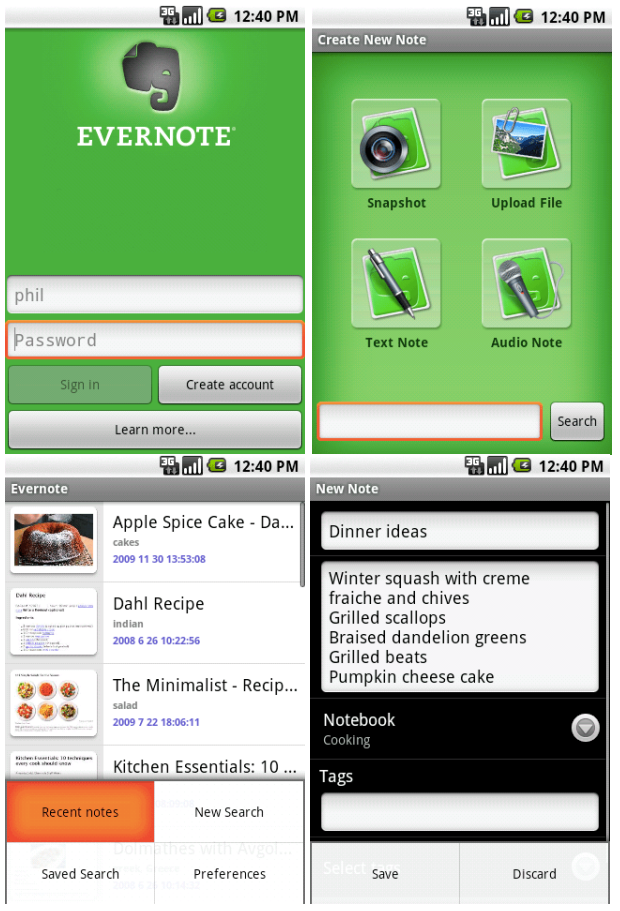
Simply put, Evernote on it's own does the job, and does it extraordinarily well. Over the past several months, they have added features that continue to bedazzle: such as the ability to not just scan a document by snapping a picture or pulling from the gallery of a device, but also the OCR recognition which makes the document searchable, and recently the business card feature. When the business card option is selected. the text from the business card "contact" fields are populated from a quick snap which then can be seamlessly saved as a new contact.

Something Special

In summarizing why Evernote  is becoming more popular by the day, and finding itself in another league despite so many apps out there with similar functionality, it simply boils down to a defining characteristic that separates the good software from great software, the mediocre from the game changer: Innovative Elegance, resulting from the painstaking, seemingly impassioned strive to make the user experience seamless and intuitive, from constant innovation and improvement of the functionality. The intuitive interaction simply makes sense, and becomes an effortless symbiosis with end user; almost as if the application was designed to anticipate our next move, and giving the sense that it was designed and created specifically for the user. 


As someone who was using smartphones before the iPhone, as much as I almost didn't want to (I was a PC person through and through) it was that elegance which made iPhone the catalyst of the smart phone explosion.Maybe Apple could take some pointers, as their brand loyalty wanes due to their never ending desire to force you to repay for their innovation.

And so Evernote, in both their commitment to excellence and innovation with a product that starts at free and doesn't suck the customer in only to squeeze every nickel or bombard them with ads,makes it truly something special.   The is not often seen in the ultra competitive "app" market, making Evernote feel like more of an open source passion product, and a mission to help us all handle the information coming at us every hour of every day.  

Getting Started with Evernote

Sign up for free at www.evernote.com or get one month of their premium service for free by visiting this exclusive sign up link. 

Monday, October 14, 2013

SimpleAssist - Daily Tech Tip: Syncing Google Apps with MS Outlook 2013

Syncing Google Apps with MS Outlook 2013 "Click to Run" (AKA Microsoft Office 365 online) - Workaround

Are you using Microsoft Office 365 2013 viz their monthly subscription?  If you are a fan of of Google Apps and Google Apps Sync as well, you have likely figured out it is not supported with Microsoft's Subscription model: MS Outlook 2013 365 (click to run).  

It make's sense that you might.   If you're a fan of Outlook, but see the writing on the wall in all things Google, their wacky little feuds (e.g. Apps Sync runs fine on all other versions of office), in my opinion  have been "bad for business"... small business that is, who enjoy the reduced pricing and added benefit of easy deployment in order to use the popular, business standard (for now) Microsoft Office products (Outlook in particular) viz a low monthly subscription for "Desktop" use, who are also intrigued in the cloud based Google Apps and it's many attractive qualities:  easy of use, user familiarity, scope of applications  and the ability to work on nearly every device out there.  

For those folks who just don't want to give up Outlook, I have included a link to a "workaround" that will enable you to do sync Outlook with Google Apps Sync.  
Like any workaround  while not "officially supported" it is is reliable, and from everything I've seen, seems to be the only free option available. 

Office 2013 Click to Run / Google Apps Sync Instructions - 

Note: SimpleAssist no responsibility for any instructional that is not specifically the direct intellectual property it's author(s).  

This author does however, attest to the fact that it worked for him without issue for several months, and would not post it otherwise.  I monitored this group as they worked through it, and I'm happy someone posted and saved me the steps.  I am doing it again currently, after a fresh install

Enjoy!


Derek Shocklee
Founder
SimpleAssist
www.simpleassistme.com
helpme@simpleasisstme.com